


Fun Fact:
When IBM introduced the first commercial computer interface in the 1960s, internal studies showed that most operators spent weeks learning to phrase requests correctly before getting useful output. Sixty years later, with AI that can hold a conversation, most people still haven’t figured out how to ask.
Somewhere between the hype cycle and the daily grind, a quiet divide has opened up.
On one side: people getting genuinely useful, precise, sometimes remarkable output from AI tools. On the other: people getting polished-sounding nonsense, generic summaries, and responses that technically answer the question while missing the point entirely.
The difference isn’t intelligence. It isn’t access. It’s almost entirely about how they’re talking to the model.
The AI Doesn’t Know What You Actually Want
Here’s the thing most tutorials won’t tell you: a language model isn’t trying to understand your intent. It’s predicting what text should follow yours. That’s a meaningful distinction — because it means the model will confidently complete a bad prompt just as fluently as a good one.
Ask “explain machine learning” and you’ll get a textbook paragraph. Ask “explain machine learning to a skeptical CFO who thinks AI is just hype, in under 150 words, using a supply chain analogy” and you’ll get something you could actually use in a meeting.
The model didn’t get smarter. You just stopped leaving it room to be generic.
The RTF Framework: The Closest Thing to a Professional Standard
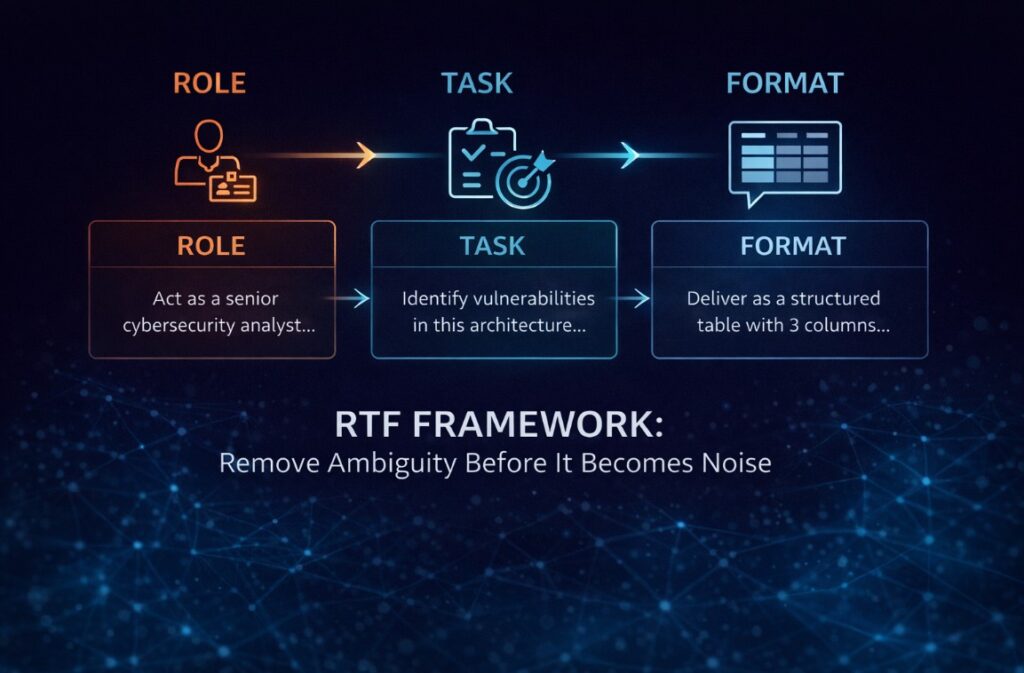
The most reliable structure for high-precision prompts is RTF — Role, Task, Format. It’s not magic. It’s just a way of removing ambiguity before the model has a chance to fill it with something useless.
I’ve watched teams spend three weeks debating which AI tool to adopt when the actual problem was a two-line prompt that gave the model zero context to work with. The tool wasn’t the issue. The briefing was.
Role tells the model who it’s supposed to be inside this context. Not “be an expert” — that’s too vague. Something like: “Act as a senior cybersecurity analyst reviewing a system architecture for a fintech startup.” The specificity matters. It narrows the probability space the model is drawing from.
Task is what you actually need done. The mistake here is combining multiple requests into one sentence. Each task deserves its own instruction. Trying to summarize, reformat, and analyze in a single prompt usually produces something that does all three poorly.
Format is where most people leave serious value on the table. If you don’t specify how you want the output, the model defaults to whatever feels natural — which usually means paragraphs when you needed a table, or a list when you needed prose. Specify it. Every time.
Context and Constraints: The Part That Actually Prevents Hallucinations
Raw compute power doesn’t prevent hallucinations. Constraints do.
When a model has no boundaries, it has no reason to stop at the edge of what it actually knows. It will drift into plausible-sounding fabrication without any obvious signal that it’s doing so. This isn’t a bug being fixed in the next release — it’s a structural tendency of how these systems work.
The fix is deliberate restriction. Phrases like “use only the information provided,” “if data is missing, say so explicitly,” and “do not invent examples not mentioned in the source” aren’t just stylistic preferences. They are guardrails that change what the model is optimizing for.
Tone constraints matter too. A prompt asking for a “formal analysis” will produce something different than one asking for “a blunt internal memo written by someone who’s seen this go wrong before.” Both are technically correct. Only one is useful for your actual purpose.
Few-Shot Prompting: Teaching by Example, Not Description
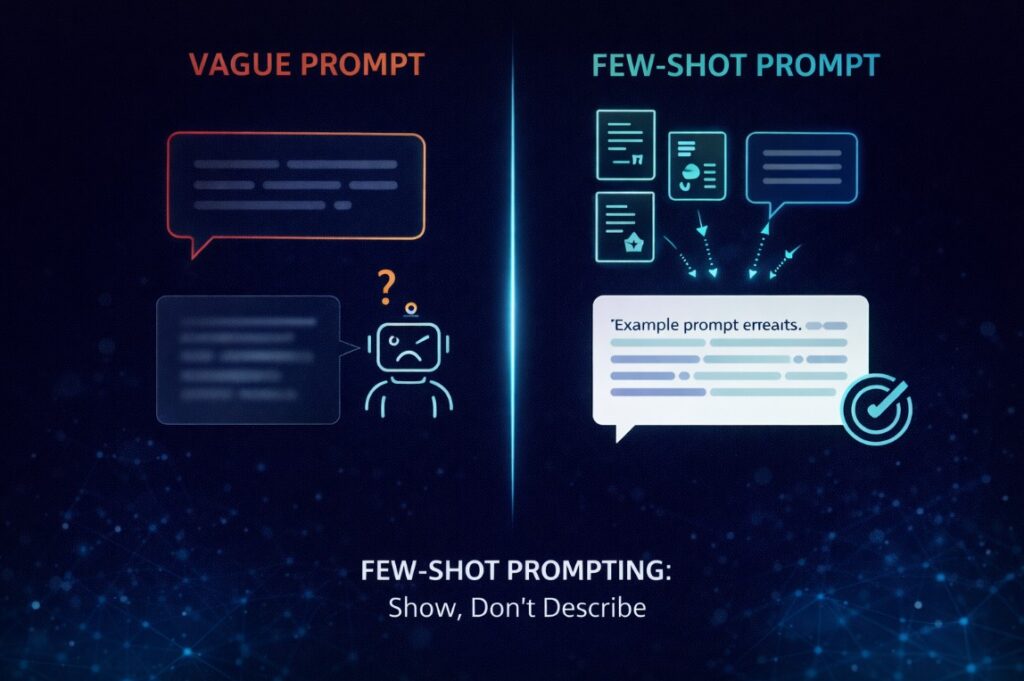
Describing what you want is harder than showing it. This is true in management, in design, and it’s true in prompting.
Few-shot prompting works by giving the model two or three examples of the output style you’re looking for before asking it to generate something new. The model picks up the pattern — tone, structure, level of detail, even sentence rhythm — and applies it without needing an elaborate description.
This is especially useful for anything with a strong house style: editorial content, brand voice, recurring report formats, technical documentation. Once you have examples that work, they become reusable assets. The prompt stops being something you write from scratch each time and starts being a template with a track record.
If you want the bigger picture behind why AI is colliding with physical limits, this companion piece explains why AI hardware—not models—is deciding the next tech cycle:
https://techfusiondaily.com/why-ai-hardware-not-models-next-tech-cycle-2026/
Chain-of-Thought: When the Answer Matters Less Than the Reasoning
For anything complex — analysis, diagnosis, strategic decisions, multi-step problems — asking the model to just answer is almost always a mistake. You want to see the work.
Chain-of-thought prompting means explicitly asking the model to reason before it concludes. Phrases like “think through this step by step before answering” or “break down the problem into stages, then give your conclusion” do something important: they force the model to surface its assumptions before they become invisible inside a polished final answer.
The output is less clean. It takes longer to read. And it’s substantially more useful — because you can see where the reasoning holds and where it doesn’t, instead of having to reverse-engineer a confident-sounding conclusion.
For anyone using AI in high-stakes contexts — investment analysis, legal review, medical research support — this isn’t optional. It’s the minimum responsible standard.
Combining Techniques: What a Professional Prompt Actually Looks Like
The prompts that consistently produce useful output aren’t one technique in isolation. They stack.
RTF combined with hard constraints gives you role clarity plus guardrails. RTF combined with few-shot examples gives you structure plus style. RTF combined with chain-of-thought reasoning gives you a framework plus auditability. In complex analytical tasks, all four working together produce output that’s closer to a junior analyst’s first draft than to a generic AI response — and that’s worth something real.
The template that covers most professional use cases looks like this: define the role, state the task precisely, provide relevant context, set explicit restrictions, specify the output format, include examples where style matters, and ask for step-by-step reasoning where stakes are high.
It sounds like a lot. It takes about 90 seconds to write. The time saved on back-and-forth, corrections, and starting over pays for it immediately.
The Iteration Loop Nobody Talks About
There’s a reason experienced prompt engineers don’t talk much about “perfect prompts.” Because the goal isn’t a perfect prompt — it’s a reliable one.
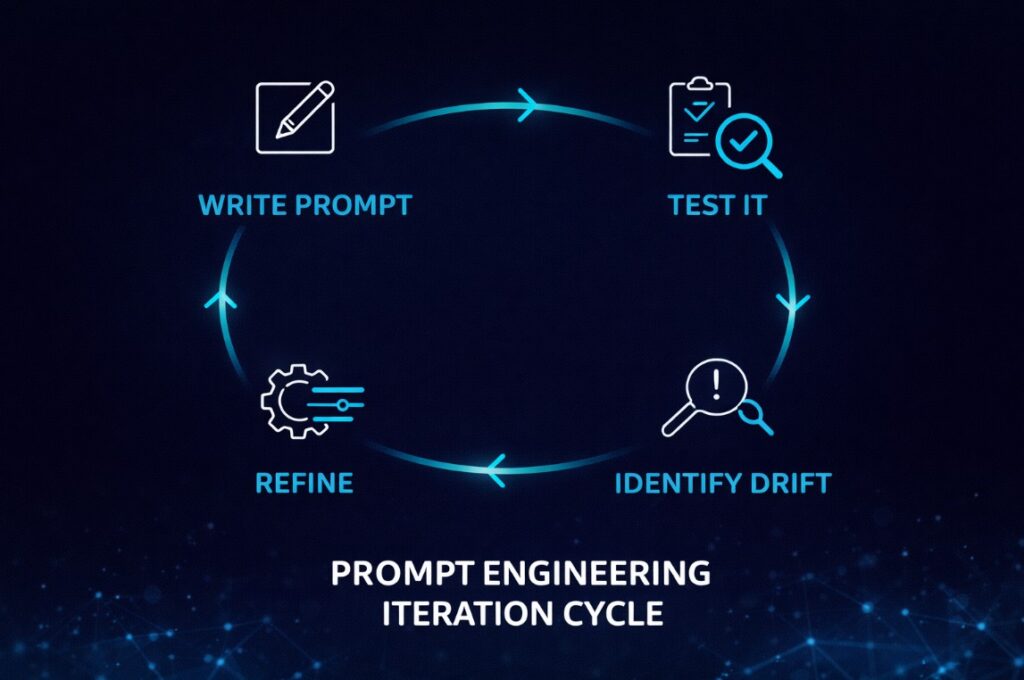
The real workflow is iterative: write a prompt, review what it produces, identify where the model drifted from your intent, tighten the instruction that allowed the drift, and run it again. After three or four cycles, you have something stable. After ten uses across different inputs, you know its failure modes.
Most people skip this loop. They try once, get mediocre output, and conclude the tool doesn’t work. The tool works. The prompt was a draft.
The Widening Gap
Here’s what nobody is saying clearly enough: the people who understand this are pulling ahead fast. Not because they have access to better models — the same tools are available to everyone. Because they’ve stopped treating AI like a search engine and started treating it like a collaborator that needs proper briefing.
The gap between someone who prompts well and someone who doesn’t isn’t closing with model improvements. If anything, more capable models amplify the difference. A well-structured prompt to a powerful model produces something genuinely useful. A vague prompt to the same model produces more confident-sounding noise.
The question isn’t whether you’re using AI. At this point, almost everyone is.
The question is whether you’re using it in a way that’s actually working — or just generating the illusion of productivity while the people who figured this out six months ago are already operating at a different level entirely.
AI won’t make the gap disappear. For most organizations, it’s the gap.
Want to keep this guide handy? Download the full PDF version — includes all frameworks and visuals.
Sources
OpenAI — official prompt engineering documentation
Google Search Central — helpful content guidelines and quality standards
Originally published at https://techfusiondaily.com



10 thoughts on “Why Most People Are Using ChatGPT Wrong — And the Gap Is Getting Wider”