

Fun Fact: Apple has refused to add touchscreens to MacBooks for over 15 years — yet third‑party innovators keep doing it for them.
A Gadget That Challenges Apple’s Long-Standing Philosophy
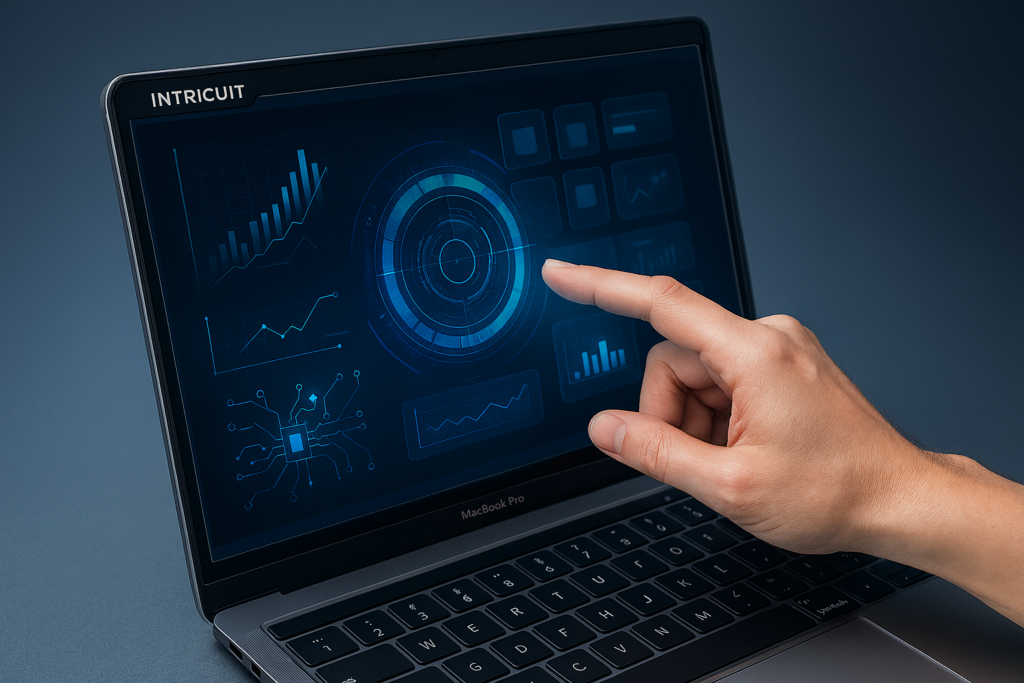
At CES 2026, Intricuit unveiled one of the most talked‑about accessories of the year: the Intricuit Magic Screen, a slim, magnetically attached overlay that instantly turns any MacBook into a fully functional touchscreen — without modifying macOS, without jailbreaking, and without external drivers.
For a company that isn’t Apple, this is a bold move.
For Apple, it’s a reminder that the market keeps demanding something the company refuses to build.
The Magic Screen sits directly above the MacBook display, using a combination of optical sensors, capacitive mapping, and a proprietary calibration layer to translate finger input into precise cursor movement. It’s thin, lightweight, and designed to blend with the MacBook’s aluminum aesthetic.
And yes — it works shockingly well.
Why This Gadget Matters More Than It Seems
Through TechFusionDaily’s editorial lens — Swisher’s sharp cultural clarity, Evans’ structural analysis, and O’Reilly’s systems thinking — the Magic Screen is more than a quirky CES accessory. It’s a commentary on the tension between user demand, platform philosophy, and the future of human–computer interaction.
1. The Cultural Signal: Users Want Touch, Even If Apple Doesn’t
Apple has repeatedly stated that touchscreens don’t belong on laptops.
Tim Cook famously compared touchscreen laptops to “a toaster–fridge combination.”
Yet consumers keep asking for it.
The Magic Screen is a cultural data point: users want hybrid interaction. They want to tap, swipe, pinch, and scroll directly on the display — especially younger users who grew up on iPads and smartphones.
Intricuit isn’t just selling a gadget.
It’s exposing a gap between Apple’s philosophy and user behavior.
2. The Market Signal: Accessory Makers Are Filling Apple’s Blind Spots
From Evans’ perspective, this is classic platform economics.
When a dominant platform refuses to build something users want, the ecosystem fills the gap:
- External GPU enclosures
- MagSafe‑style chargers before Apple brought them back
- Touch Bar replacements
- iPad keyboard cases that mimic laptops
- And now, touchscreen overlays for MacBooks
The Magic Screen is part of a broader pattern:
third‑party innovation thrives where Apple chooses not to compete.
3. The Systems Signal: Hybrid Interaction Is the Future
O’Reilly’s systems thinking highlights something deeper:
the future of computing is multimodal.
Touch + keyboard + trackpad + voice + gesture + AI assistance.
The Magic Screen isn’t just a workaround — it’s a prototype of a future where laptops adapt to multiple input modes depending on context:
- Touch for creative tasks
- Trackpad for precision
- Keyboard for productivity
- Voice for automation
- AI for prediction and correction
Apple may resist touchscreens on MacBooks, but the industry is moving toward hybrid interaction whether they like it or not.
How the Intricuit Magic Screen Works
According to Intricuit’s technical documentation and CES demos, the Magic Screen uses a layered approach:
Optical Edge Sensors
Tiny sensors along the frame detect finger movement and translate it into precise cursor coordinates.
Capacitive Mapping
A transparent capacitive layer tracks touch gestures like pinch‑to‑zoom and multi‑finger swipes.
Zero‑Driver Integration
The accessory communicates with macOS as if it were a pointing device, avoiding system‑level conflicts.
Magnetic Alignment
The frame snaps onto the MacBook bezel without adhesives, screws, or permanent modifications.
Calibration Layer
A guided setup ensures the overlay aligns perfectly with the display’s pixel grid.
In practice, the experience is surprisingly smooth.
Gestures feel natural, taps register quickly, and latency is low enough for everyday use.
Compatibility and Limitations
The Magic Screen supports:
- MacBook Air (M1–M4)
- MacBook Pro (14‑inch and 16‑inch, M1–M4)
- Older Intel MacBooks (limited support)
Limitations include:
- Slight glare under strong lighting
- Reduced brightness due to the overlay
- Not ideal for color‑critical work
- Occasional misalignment if the frame is bumped
Still, for a first‑generation product, reviewers at CES were impressed.
Why This Gadget Exists: The Apple Paradox
Apple’s refusal to add touchscreens to MacBooks has created a strange paradox:
- The iPad is touch‑first but lacks macOS power
- The MacBook is power‑first but lacks touch
- Users want both in one device
The Magic Screen is a response to that tension.
It’s not trying to replace Apple’s design philosophy — it’s trying to bridge the gap Apple refuses to close.
The Bigger Picture: What This Means for the Future of Laptops
The Magic Screen hints at a future where:
- Laptops become modular
- Input methods become fluid
- Accessories become extensions of the OS
- Users customize their workflow instead of adapting to manufacturer limitations
It also raises questions:
- Will Apple eventually cave and add touchscreens?
- Will third‑party overlays become mainstream?
- Will hybrid laptops dominate the next decade?
The Magic Screen doesn’t answer these questions — but it forces the conversation.
Final Thought: A Small Gadget With Big Implications
The Intricuit Magic Screen is more than a CES novelty.
It’s a cultural signal, a market signal, and a systems signal.
It challenges Apple’s assumptions.
It empowers users.
And it hints at a future where laptops evolve beyond rigid input boundaries.
Sometimes the most important innovations aren’t the ones that replace the system —
but the ones that reveal what the system refuses to become.
Editorial References
- PCMag coverage of Intricuit Magic Screen at CES 2026
- Lifehacker analysis of touchscreen overlay performance
- MacRumors report on third‑party MacBook touchscreen solutions
- Intricuit official product documentation (CES 2026 release)